Build package
Build UMI Gripper (Universal Manipulation Interface)
Stanford / Columbia / Toyota Research Institute · Gripper · research · 2024
Handheld, trigger-activated 3D-printed parallel-jaw gripper with a GoPro and side mirrors for in-the-wild demonstration collection, with policies deployable on robot-mounted grippers.
Two ways to get UMI Gripper (Universal Manipulation Interface)
Compare all →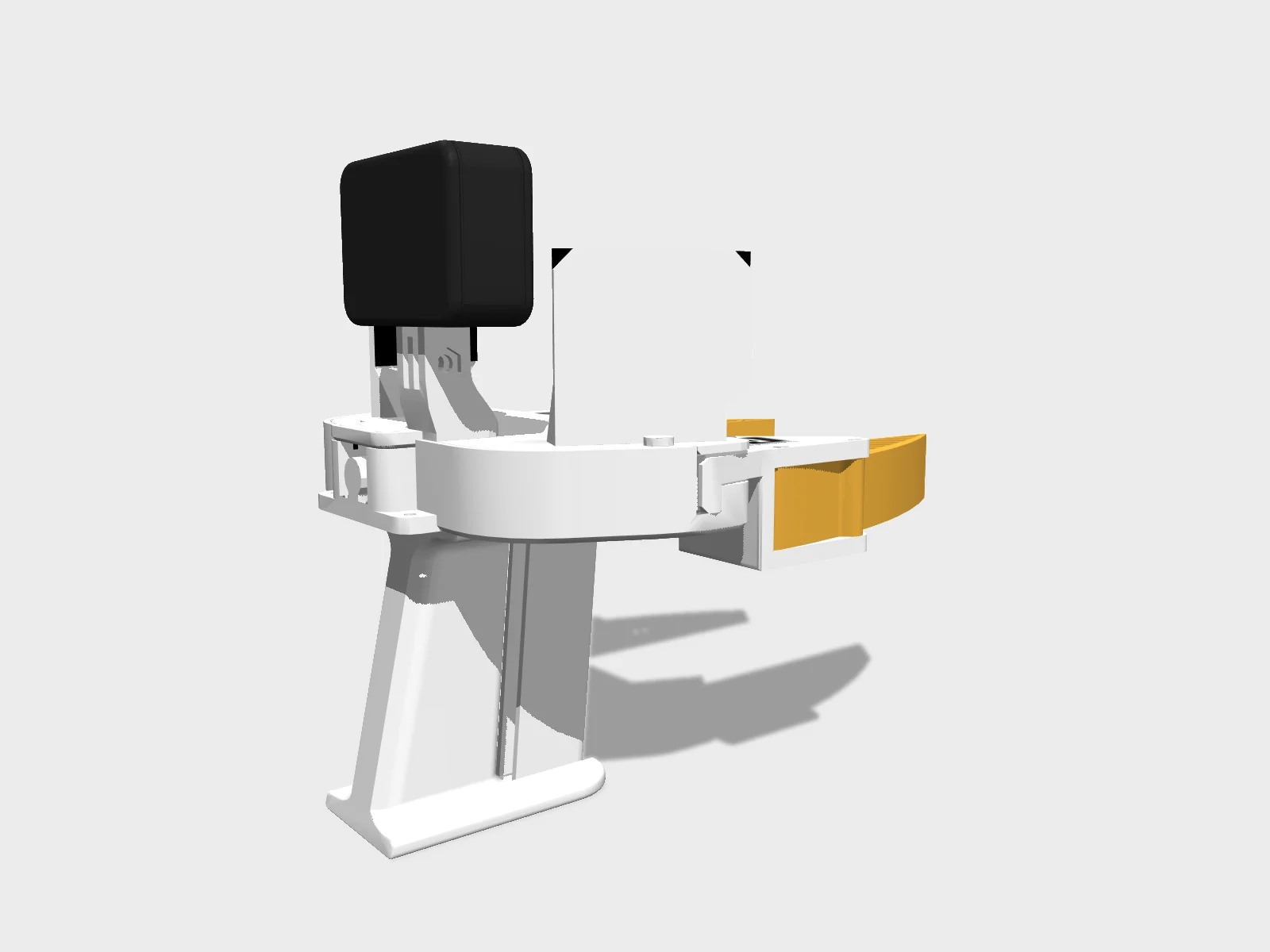
- Drawing
- /stanford/umi-gripper
- Maker
- Stanford / Columbia / Toyota Research Institute
- Country
- Stanford, US
- Package rev
- v0.1.0
- Level
- L2 Sim-verified
- Availability
- DIY
- Openness
- 85/100
- HW licence
- unknown
- Last checked
- 2026-09-25
- Size
- No sourced height, mass or DOF yet
Presented at RSS 2024. Repo provides a pretrained checkpoint (cup arrangement). A simplified MJCF is in MuJoCo Menagerie (umi_gripper). The build guide (BOM, CAD, print settings, deployment) is the UMI Hardware Guide Google Doc; assembly is shown in video only. Code is MIT; the gripper mechanism and soft finger are adapted from third-party designs whose licenses are not stated.
Configure
Saved in the URL. Share the link to share the build.Source
One cart across 3 vendors · prices in USD as listed26 lines · 25 parts · 4 without an offer in US · 2/26 lines sourced in 2+ regions (L3 gate)
| # | Part | Category | Qty | Unit | Line | Offer |
|---|---|---|---|---|---|---|
Amazon20 lines · $945.99 + 2 unpriced | ||||||
| 1 | eSUN PLA PRO (PLA+) Warm White 1 kg (half a spool per gripper) gripper.pla | printed | 0.5 | $24.99 | $12.50 | AmazonLink from the UMI Hardware Guide BOM |
| 2 | MGN9C 150 mm linear rail with carriage gripper.mgn9c-rail · MPN MGN9C 150 mm | structure | 2 | $17.89 | $35.78 | AmazonLink from the UMI Hardware Guide BOM |
| 3 | M3 screw and nut assortment (per gripper: 14x M3x8, 2x M3x12, 4x M3x25, 6x M3x35; half a kit) gripper.m3-kit | fastener | 0.5 | $22.99 | $11.50 | AmazonLink from the UMI Hardware Guide BOM |
| 4 | Compression spring, 10 mm OD, 0.7 mm wire, 50 mm free length (0.2 of a pack) gripper.spring | structure | 0.2 | $5.49 | $1.10 | AmazonLink from the UMI Hardware Guide BOM |
| 5 | Plastic stick-on mirror (side mirrors; quantity not stated upstream) gripper.mirror | sensor | 1 | $9.99 | $9.99 | AmazonLink from the UMI Hardware Guide BOM |
| 6 | Super Lube 21030 synthetic grease (quantity not stated upstream) gripper.super-lube · MPN 21030 | other | 1 | $10.00 | $10.00 | AmazonLink from the UMI Hardware Guide BOM |
| 7 | Double-sided tape, ultra-thin (quantity not stated upstream) gripper.double-sided-tape | other | 1 | $9.99 | $9.99 | AmazonLink from the UMI Hardware Guide BOM |
| 8 | Polymaker TPU 95A Orange 750 g (0.25 spool per gripper, soft fingers) gripper.tpu | printed | 0.25 | $29.99 | $7.50 | AmazonLink from the UMI Hardware Guide BOM |
| 9 | 3M TB641/GM641 grip tape, 1 in wide (1 ft per gripper; 0.07 of a roll) gripper.grip-tape · MPN TB641 / GM641 | other | 0.07 | $54.14 | $3.79 | AmazonLink from the UMI Hardware Guide BOM |
| 10 | GoPro HERO9 Black gripper.gopro-hero9 · MPN HERO9 Black | sensor | 1 | $209.99 | $209.99 | AmazonLink from the UMI Hardware Guide BOM |
| 11 | GoPro Max Lens Mod 1.0 (ultra-wide lens for HERO9) gripper.max-lens-mod · MPN Max Lens Mod 1.0 | sensor | 1 | $69.29 | $69.29 | AmazonLink from the UMI Hardware Guide BOM |
| 12 | microSD card, V30 rated gripper.microsd | electronics | 1 | $17.99 | $17.99 | AmazonLink from the UMI Hardware Guide BOM |
| 13 | Spare GoPro batteries and charger (optional for all-day use: 2 extra batteries + 1 charger per gripper) gripper.spare-batteries | power | 1 | unpriced | — | AmazonLink from the UMI Hardware Guide; no price given |
| 14 | GoPro HERO9 Black (robot wrist camera) deploy.gopro-hero9 · MPN HERO9 Black | sensor | 1 | $209.99 | $209.99 | AmazonLink from the UMI Hardware Guide BOM |
| 15 | GoPro Max Lens Mod 1.0 (robot camera) deploy.max-lens-mod · MPN Max Lens Mod 1.0 | sensor | 1 | $69.29 | $69.29 | AmazonLink from the UMI Hardware Guide BOM |
| 16 | GoPro Media Mod for HERO9 (HDMI out) deploy.media-mod | electronics | 1 | $79.99 | $79.99 | AmazonLink from the UMI Hardware Guide BOM |
| 17 | Elgato HD60 X capture card deploy.capture-card · MPN HD60 X | electronics | 1 | $147.34 | $147.34 | AmazonLink from the UMI Hardware Guide BOM |
| 18 | Micro HDMI to HDMI cable, 15 ft deploy.hdmi-cable | cable | 1 | $12.99 | $12.99 | AmazonLink from the UMI Hardware Guide BOM |
| 19 | USB-C to USB-A cable, 10 ft deploy.usb-cable | cable | 2 | $13.49 | $26.98 | AmazonLink from the UMI Hardware Guide BOM |
| 20 | 3Dconnexion SpaceMouse Wireless (manual control during eval) deploy.spacemouse | electronics | 1 | unpriced | — | AmazonLinked from the README; no price given |
Google Drive (UMI)1 line · unpriced | ||||||
| 21 | Printed ArUco tags, US letter (aruco_gripper_0 / aruco_gripper_1; left and right grippers differ) gripper.aruco-tags | other | 1 | unpriced | — | Google Drive (UMI)ships globallyPDFs to print; free |
Universal Robots1 line · unpriced | ||||||
| 22 | Universal Robots UR5e or UR5-CB3 arm (with power and ethernet cable) deploy.ur5 · 2 alt | actuator | 1 | unpriced | — | Universal Robotsships globallyBy quote per the Hardware Guide |
No offer in this region4 lines · unpriced | ||||||
| 23 | M5 nut gripper.m5-nut | fastener | 1 | unpriced | — | No offer found yet |
| 24 | Weiss Robotics WSG-50 gripper (with power and ethernet cable, no fingers) deploy.wsg50 · MPN WSG 50 | actuator | 1 | unpriced | — | Offers in EU only |
| 25 | Router / ethernet switch (workstation, UR5 and WSG-50 on one network) deploy.network | electronics | 1 | unpriced | — | No offer found yet |
| 26 | Ubuntu 22.04 workstation with NVIDIA GPU (training tested on RTX 3090 24 GB) compute.workstation | compute | 1 | unpriced | — | No offer found yet |
| Cart total · US | 25 | $945.99 | 8 lines unpriced, not in total | |||
Fabricate
Planned for a 256 mm bed- Fabricated parts
- 13
- Print time (sum)
- —
- Material (sum)
- —
- Plates · estimate
- —
No plate estimate: the package does not list grams per part yet, and we will not guess them. Slice the source files for your 256 mm bed.
| Part | Process | Material | Qty | h / part | g / part | Profile |
|---|---|---|---|---|---|---|
bottom_plate (Print 1: gripper_covers) printed.bottom-plate | FDM | PLA+ (eSUN PLA PRO) | 1 | — | — | 0.6 mm nozzle, 0.3 mm layers, 1.2 mm walls, 1.2 mm top/bottom, 20% gyroid, 190 C (eSUN PLA+), fan 100% |
top_plate (Print 1: gripper_covers) printed.top-plate | FDM | PLA+ (eSUN PLA PRO) | 1 | — | — | 0.6 mm nozzle, 0.3 mm layers, 1.2 mm walls, 1.2 mm top/bottom, 20% gyroid, 190 C (eSUN PLA+), fan 100% |
grip (Print 2: gripper_internals) printed.grip | FDM | PLA+ (eSUN PLA PRO) | 1 | — | — | 0.6 mm nozzle, 0.3 mm layers, 1.2 mm walls, 1.2 mm top/bottom, 20% gyroid, 190 C (eSUN PLA+), fan 100%; part override: 100% infill, 1.8 mm top/bottom |
handle (Print 2: gripper_internals) printed.handle | FDM | PLA+ (eSUN PLA PRO) | 1 | — | — | 0.6 mm nozzle, 0.3 mm layers, 1.2 mm walls, 1.2 mm top/bottom, 20% gyroid, 190 C (eSUN PLA+), fan 100% |
Cube (Print 2: gripper_internals; carries ArUco tags that are currently unused) printed.cube | FDM | PLA+ (eSUN PLA PRO) | 1 | — | — | 0.6 mm nozzle, 0.3 mm layers, 1.2 mm walls, 1.2 mm top/bottom, 20% gyroid, 190 C (eSUN PLA+), fan 100% |
finger_holder_left / finger_holder_right (Print 2) printed.finger-holder | FDM | PLA+ (eSUN PLA PRO) | 2 | — | — | 0.6 mm nozzle, 0.3 mm layers, 1.2 mm walls, 1.2 mm top/bottom, 20% gyroid, 190 C (eSUN PLA+), fan 100%; part override: supports on |
gear_left / gear_right (Print 2) printed.gear | FDM | PLA+ (eSUN PLA PRO) | 2 | — | — | 0.6 mm nozzle, 0.3 mm layers, 1.2 mm walls, 1.2 mm top/bottom, 20% gyroid, 190 C (eSUN PLA+), fan 100% |
linkage_left / linkage_right (Print 2) printed.linkage | FDM | PLA+ (eSUN PLA PRO) | 2 | — | — | 0.6 mm nozzle, 0.3 mm layers, 1.2 mm walls, 1.2 mm top/bottom, 20% gyroid, 190 C (eSUN PLA+), fan 100%; part override: 2.4 mm walls, 1.8 mm top/bottom |
finger plate (Print 3: gripper_fingers, 6_finger.3mf) printed.fingers | FDM | TPU 95A (Polymaker) | 1 | — | — | 0.6 mm nozzle, 0.3 mm layers, 100% lines infill, 255 C (Polymaker TPU 95A), fan 0% |
WSG50-UR5 mount with GoPro/mirror mounting plate (6_nylon_cf_wsg50_ur5_mount.3mf) printed.wsg50-ur5-mount | FDM | PA6-CF (Polymaker) | 1 | — | — | 0.6 mm nozzle, 0.2 mm layers, 270 C, bed 70 C first layer then 35 C (different first-layer bed temperature is critical for adhesion), fan 0% |
Assemble
Every step ends in a check- Steps
- 21
- Subassemblies
- 8
- Hands-on time (sum)
- —
- Critical path
- —
- Your progress · this device
- —
21 steps have no time estimate; times above are lower bounds.
Steps, in build order
- Fabrication01
Print the PLA+ gripper body (covers and internals)
Slice `6_gripper_covers.3mf` and `6_gripper_internals.3mf` from the Drive folder (Cura projects with the per-part settings). Common settings: 0.6 mm nozzle, 0.3 mm layers, 1.2 mm walls and top/bottom, 20% gyroid, 190 C, fan 100%. Overrides: grip 100% infill and 1.8 mm top/bottom; finger holders need supports; linkages 2.4 mm walls and 1.8 mm top/bottom. See the 3D printing tutorial video.
CHECKAll parts on both plates print without layer separation; gears mesh and turn freely against each other by hand.- Parts in
- eSUN PLA PRO (PLA+) Warm White 1 kg (half a spool per gripper)gripper.pla
- bottom_plate (Print 1: gripper_covers)printed.bottom-plate
- top_plate (Print 1: gripper_covers)printed.top-plate
- grip (Print 2: gripper_internals)printed.grip
- handle (Print 2: gripper_internals)printed.handle
- Cube (Print 2: gripper_internals; carries ArUco tags that are currently unused)printed.cube
- finger_holder_left / finger_holder_right (Print 2)printed.finger-holder
- gear_left / gear_right (Print 2)printed.gear
- linkage_left / linkage_right (Print 2)printed.linkage
- Tools
- FDM printer with 0.6 mm nozzle, Ultimaker Cura
- Torque
- —
- Time
- —
- After
- Start
- Source
- docs.google.com
- 02
Print the TPU soft fingers
Print `6_finger.3mf` in TPU 95A: 0.6 mm nozzle, 0.3 mm layers, 100% lines infill, 255 C, cooling fan off.
CHECKFingers are fully dense (no gaps between lines) and flex back to shape after bending by hand.- Parts in
- Polymaker TPU 95A Orange 750 g (0.25 spool per gripper, soft fingers)gripper.tpu
- finger plate (Print 3: gripper_fingers, 6_finger.3mf)printed.fingers
- Tools
- FDM printer with 0.6 mm nozzle (TPU-capable)
- Torque
- —
- Time
- —
- After
- Start
- Source
- docs.google.com
- Software03
Install the UMI software and run the example SLAM session
On Ubuntu 22.04 install Docker (with the linux-postinstall steps) and `sudo apt install -y libosmesa6-dev libgl1-mesa-glx libglfw3 patchelf`, then `mamba env create -f conda_environment.yaml` and `conda activate umi`. Download the example with `wget --recursive --no-parent --no-host-directories --cut-dirs=2 --relative --reject="index.html*" https://real.stanford.edu/umi/data/example_demo_session/` and run `python run_slam_pipeline.py example_demo_session`.
CHECKThe pipeline prints `99% of raw data are used.` and `n_dropped_demos 0` for the example session.- Parts in
- Ubuntu 22.04 workstation with NVIDIA GPU (training tested on RTX 3090 24 GB)compute.workstation
- Tools
- Docker, Miniforge (mamba)
- Torque
- —
- Time
- —
- After
- Start
- Source
- github.com
- Deployment04
Print the WSG50-UR5 mount in PA6-CF
Print `6_nylon_cf_wsg50_ur5_mount.3mf`: 0.6 mm nozzle, 0.2 mm layers, 270 C, bed 70 C for the first layer then 35 C, fan off.
CHECKThe mount comes off the bed without warping and bolts flat to the UR5 flange.- Parts in
- WSG50-UR5 mount with GoPro/mirror mounting plate (6_nylon_cf_wsg50_ur5_mount.3mf)printed.wsg50-ur5-mount
- Tools
- FDM printer for PA6-CF (hardened 0.6 mm nozzle)
- Torque
- —
- Time
- —
- After
- Start
- Source
- docs.google.com
- 05
Set up the SpaceMouse
`sudo apt install libspnav-dev spacenavd`, then `sudo systemctl start spacenavd`.
CHECK`systemctl status spacenavd` shows the service active and moving the SpaceMouse produces events.- Parts in
- 3Dconnexion SpaceMouse Wireless (manual control during eval)deploy.spacemouse
- Tools
- —
- Torque
- —
- Time
- —
- After
- Start
- Source
- github.com
- Handheld gripper06
Assemble the gripper mechanism
Follow the gripper assembly video: mount the two MGN9C rails, the finger holders on the carriages, the left/right gears and linkages, the spring and trigger/handle, then close the covers. Screws per gripper: 14x M3x8, 2x M3x12, 4x M3x25, 6x M3x35, plus one M5 nut. Grease the rails and gears with Super Lube.
CHECKSqueezing the trigger closes both finger holders symmetrically along the rails, and the mechanism moves back smoothly on release with no sticking on the rails.- Parts in
- MGN9C 150 mm linear rail with carriagegripper.mgn9c-rail
- M3 screw and nut assortment (per gripper: 14x M3x8, 2x M3x12, 4x M3x25, 6x M3x35; half a kit)gripper.m3-kit
- Compression spring, 10 mm OD, 0.7 mm wire, 50 mm free length (0.2 of a pack)gripper.spring
- M5 nutgripper.m5-nut
- Super Lube 21030 synthetic grease (quantity not stated upstream)gripper.super-lube
- bottom_plate (Print 1: gripper_covers)printed.bottom-plate
- top_plate (Print 1: gripper_covers)printed.top-plate
- grip (Print 2: gripper_internals)printed.grip
- handle (Print 2: gripper_internals)printed.handle
- gear_left / gear_right (Print 2)printed.gear
- linkage_left / linkage_right (Print 2)printed.linkage
- finger_holder_left / finger_holder_right (Print 2)printed.finger-holder
- Tools
- M3 hex key, Screwdriver
- Torque
- —
- Time
- —
- After
- 01
- Source
- youtu.be
- Deployment07
Install WSG-50, GoPro and mirrors on the UR5
Install the WSG-50 on the UR5 flange with the printed mount, then install the GoPro (with Max Lens Mod) and the mirrors on the mounting plate so the camera view matches the handheld gripper.
CHECKThe robot camera image shows fingers and mirrors in the same positions as on the handheld gripper.- Parts in
- Universal Robots UR5e or UR5-CB3 arm (with power and ethernet cable)deploy.ur5
- Weiss Robotics WSG-50 gripper (with power and ethernet cable, no fingers)deploy.wsg50
- GoPro HERO9 Black (robot wrist camera)deploy.gopro-hero9
- GoPro Max Lens Mod 1.0 (robot camera)deploy.max-lens-mod
- Plastic stick-on mirror (side mirrors; quantity not stated upstream)gripper.mirror
- WSG50-UR5 mount with GoPro/mirror mounting plate (6_nylon_cf_wsg50_ur5_mount.3mf)printed.wsg50-ur5-mount
- finger plate (Print 3: gripper_fingers, 6_finger.3mf)printed.fingers
- Tools
- Hex keys
- Torque
- —
- Time
- —
- Source
- docs.google.com
- Handheld gripper08
Fit the soft fingers and grip tape
Attach the TPU fingers to the finger holders and apply about 1 ft of 3M TB641/GM641 grip tape per gripper as in the assembly video.
CHECKFingers meet along their full length when the trigger is fully squeezed and the tape does not peel at the edges.- Parts in
- finger plate (Print 3: gripper_fingers, 6_finger.3mf)printed.fingers
- 3M TB641/GM641 grip tape, 1 in wide (1 ft per gripper; 0.07 of a roll)gripper.grip-tape
- Tools
- —
- Torque
- —
- Time
- —
- Source
- youtu.be
- Deployment09
Configure the UR5 from the teach pendant
Safety · human-verified requiredPut the workstation, UR5 and WSG-50 behind the same router/switch. Put the UR5 IP into `example/eval_robots_config.yaml` (robots/robot_ip). In Installation > Payload set mass 1.81 kg and centre of gravity (2, -6, 37) mm. TCP is set by the eval script. On a UR5e switch the control mode to remote. For Franka follow franka_instruction.md.
CHECKThe pendant shows payload 1.81 kg with the stated CoG, the workstation pings the robot IP, and a freedrive test shows the arm holding position without drift.This step can hurt a person or ruin parts. Its instructions need sign-off by a human who has done it before relying on them. Stop and ask if anything differs from what you see.
- Parts in
- Universal Robots UR5e or UR5-CB3 arm (with power and ethernet cable)deploy.ur5
- Router / ethernet switch (workstation, UR5 and WSG-50 on one network)deploy.network
- Tools
- —
- Torque
- —
- Time
- —
- After
- 07
- Source
- github.com
- 10
Configure the WSG-50 gripper
In the WSG-50 web interface: set its IP in `eval_robots_config.yaml` (grippers/gripper_ip); Settings > Command Interface: disable 'Use text based Interface', enable CRC; Scripting > File Manager: upload `umi/real_world/cmd_measure.lua`; Settings > System: enable Startup Script and select `/user/cmd_measure.lua`.
CHECKAfter a gripper power cycle the web interface shows cmd_measure.lua running as the startup script.- Parts in
- Weiss Robotics WSG-50 gripper (with power and ethernet cable, no fingers)deploy.wsg50
- Router / ethernet switch (workstation, UR5 and WSG-50 on one network)deploy.network
- Tools
- —
- Torque
- —
- Time
- —
- After
- 07
- Source
- github.com
- 11
Connect the robot camera to the workstation
GoPro to Media Mod, Media Mod HDMI to the Elgato capture card, capture card USB to the workstation, and GoPro USB to a power supply. Install GoPro Labs firmware, set date and time, and scan the README's QR code for clean HDMI output. Grant access with `sudo chmod -R 777 /dev/bus/usb`.
CHECKThe capture card appears as a video device on the workstation and shows the GoPro image with no on-screen overlay.- Parts in
- GoPro HERO9 Black (robot wrist camera)deploy.gopro-hero9
- GoPro Media Mod for HERO9 (HDMI out)deploy.media-mod
- Elgato HD60 X capture carddeploy.capture-card
- Micro HDMI to HDMI cable, 15 ftdeploy.hdmi-cable
- USB-C to USB-A cable, 10 ftdeploy.usb-cable
- Tools
- —
- Torque
- —
- Time
- —
- After
- 07
- Source
- github.com
- Handheld gripper12
Mount the GoPro, Max Lens Mod and side mirrors
Fit the Max Lens Mod to the HERO9, insert the microSD card and mount the camera on the gripper. Fix the stick-on mirror pieces to the gripper's mirror mounts with the double-sided tape, as shown in the assembly video.
CHECKIn the camera preview both fingers and both mirror views are visible in the ultra-wide image.- Parts in
- GoPro HERO9 Blackgripper.gopro-hero9
- GoPro Max Lens Mod 1.0 (ultra-wide lens for HERO9)gripper.max-lens-mod
- Plastic stick-on mirror (side mirrors; quantity not stated upstream)gripper.mirror
- Double-sided tape, ultra-thin (quantity not stated upstream)gripper.double-sided-tape
- microSD card, V30 ratedgripper.microsd
- Tools
- —
- Torque
- —
- Time
- —
- After
- 08
- Source
- youtu.be
- 13
Apply the ArUco tags
Print the tag PDFs on US letter at 100% scale and stick them on as in the reference photos. Left and right grippers use different tag sets (aruco_gripper_0 and aruco_gripper_1). Tags on the large cube are not used by the current pipeline and are optional.
CHECKThe finger tags are fully visible to the GoPro across the gripper's opening range.- Parts in
- Printed ArUco tags, US letter (aruco_gripper_0 / aruco_gripper_1; left and right grippers differ)gripper.aruco-tags
- Cube (Print 2: gripper_internals; carries ArUco tags that are currently unused)printed.cube
- Tools
- —
- Torque
- —
- Time
- —
- After
- 08
- Source
- docs.google.com
- Deployment14
First motion: run the pretrained cup arrangement policy
Safety · human-verified required`wget https://real.stanford.edu/umi/data/pretrained_models/cup_wild_vit_l_1img.ckpt`, then `python eval_real.py --robot_config=example/eval_robots_config.yaml -i cup_wild_vit_l_1img.ckpt -o data/eval_cup_wild_example` (the README passes `cup_wild_vit_l.ckpt`; use the name you downloaded). Drive the robot with the SpaceMouse (buttons open/close the gripper), press `C` to start the policy and `S` to stop. Keep a hand on the UR e-stop. Avoid direct sunlight.
CHECKWith an espresso cup and saucer on the table, the robot rotates the cup and places it on the saucer, and pressing `S` stops the policy immediately.This step can hurt a person or ruin parts. Its instructions need sign-off by a human who has done it before relying on them. Stop and ask if anything differs from what you see.
- Parts in
- —
- Tools
- —
- Torque
- —
- Time
- —
- Source
- github.com
- Camera15
Install GoPro Labs firmware and UMI camera settings
Install the GoPro Labs experimental firmware, then scan the UMI settings QR code from the Data Collection Instruction (Step 0) to apply the standard camera settings.
CHECKThe GoPro shows the Labs splash on boot and confirms the QR settings on screen after scanning.- Parts in
- GoPro HERO9 Blackgripper.gopro-hero9
- Tools
- Phone or PC screen for QR codes
- Torque
- —
- Time
- —
- After
- 12
- Data collection16
Sync the GoPro timecode
Open https://umi-gripper.github.io/qrlocal/ and scan the refreshing QR code with the GoPro. Essential for bimanual collection, where both grippers must be time-synchronised. Adjust distance if it does not scan.
CHECKThe GoPro confirms the QR scan and its clock matches the workstation clock to the second.- Parts in
- GoPro HERO9 Blackgripper.gopro-hero9
- Tools
- —
- Torque
- —
- Time
- —
- After
- 15
- 17
Record the SLAM mapping video
Print the table marker (https://umi-gripper.github.io/share/table_marker.pdf) at 100% scale so the marker is exactly 16 mm, place it on the table and record the mapping video following the tutorial video. Choose a textured scene; avoid large plain surfaces such as white walls, ceilings and corners.
CHECKThe printed marker measures 16 mm, and the mapping video covers the whole workspace with the marker visible at the start.- Parts in
- —
- Tools
- —
- Torque
- —
- Time
- —
- 18
Record the gripper calibration video
Record one video opening and closing the gripper 5 times.
CHECKBoth finger tags are tracked in every frame of the video (checked later by 04_detect_aruco / 05_run_calibrations).- Parts in
- —
- Tools
- —
- Torque
- —
- Time
- —
- After
- 17
- 19
Record task demonstrations
Record one video per demonstration in the same session location. The instruction recommends about 200 demonstrations for a single task in a fixed environment.
CHECKEvery demonstration video starts and ends with the gripper in view of the mapped scene and none is cut off mid-grasp.- Parts in
- —
- Tools
- —
- Torque
- —
- Time
- —
- After
- 18
- Processing20
Run the SLAM pipeline on your session
Copy the MP4s into `<session>/raw_videos` (the script creates it and treats the largest file as `mapping.mp4` and the first video per camera as gripper calibration if you do not). Run `python run_slam_pipeline.py <session>`, then `python scripts_slam_pipeline/07_generate_replay_buffer.py -o <session>/dataset.zarr.zip <session>`.
CHECKThe pipeline reports a high share of raw data used and few dropped demos (low SLAM success means the collection instructions were not followed), and `dataset.zarr.zip` is written.- Parts in
- Ubuntu 22.04 workstation with NVIDIA GPU (training tested on RTX 3090 24 GB)compute.workstation
- Tools
- —
- Torque
- —
- Time
- —
- Source
- github.com
- Policy21
Train a diffusion policy
Single GPU: `python train.py --config-name=train_diffusion_unet_timm_umi_workspace task.dataset_path=<session>/dataset.zarr.zip`. Multi-GPU: `accelerate --num_processes <ngpus> train.py ...`. The processed cup dataset is also downloadable: `wget https://real.stanford.edu/umi/data/zarr_datasets/cup_in_the_wild.zarr.zip` (about 18 GB).
CHECKTraining runs without out-of-memory errors and writes checkpoints; loss decreases over the first epochs.- Parts in
- Ubuntu 22.04 workstation with NVIDIA GPU (training tested on RTX 3090 24 GB)compute.workstation
- Tools
- NVIDIA GPU (RTX 3090 24 GB tested)
- Torque
- —
- Time
- —
- After
- 20
- Source
- github.com
Progress is stored in this browser only (localStorage). Nothing is sent anywhere.
Bring-up
Flash · calibrate · first policy- A
Flash firmware
TargetsGoPro HERO9 (GoPro Labs firmware + UMI settings QR), Weiss WSG-50 (Lua startup script umi/real_world/cmd_measure.lua), UR5e / UR5-CB3 (stock controller, remote control mode)
Repogithub.com/real-stanford/universal_manipulation_interface
SLAM uses the authors' ORB_SLAM3 fork (github.com/cheng-chi/ORB_SLAM3) via the chicheng/orb_slam3 Docker image. Time sync uses the umi-gripper.github.io/qrlocal QR timecode.
- B
Calibrate
CalibrationPer session: record a gripper calibration video (open/close 5 times) and a mapping video with the 16 mm table marker; `python run_slam_pipeline.py <session>` runs 04_detect_aruco and 05_run_calibrations. GoPro intrinsics ship as example/calibration/gopro_intrinsics_2_7k.json (calibrated with OpenImuCameraCalibrator).Log the output. It goes in your build report.
- C
First policy
- In-the-wild cup arrangement (rotate espresso cup, place on saucer)Diffusion Policy (UMI), fine-tuned CLIP ViT-L backbone source
Try the policy in the browser sim before it touches hardware. Keep a hand near the power switch the first time a policy runs on the real robot.
Report your build
Moves UMI Gripper (Universal Manipulation Interface) toward L4 · BuiltA build report is the only thing that proves a package works. It raises the level, puts a point on the map, and tells the Foreman which steps to rewrite.
Level gate
Holds L2 · evidence, not confidence- L0Indexed
Known to exist. Atlas page only.
- 6 sources on record(met)
- L1Compiled
Package validates against the spec; every fact has a source.
- Build package compiled(met)
- 19 sources across robot and package(met)
- L2Sim-verified
Loads in browser and GPU sim, mass within tolerance of the BOM, holds a stand. Unlocks .training.
- URDF/MJCF is public(met)
- Sim load, mass tolerance and stand are checked on .training(checked elsewhere)
- L3Sourced
Every BOM line resolves to a live offer in at least two regions. Unlocks the one-click cart.
- 0/26 BOM lines have offers in 2+ regions(not met)
- L4Built
At least one community build report with photos and bring-up logs. Unlocks Build it as the main action.
- 0 reviewed build reports(not met)
- Review feed unreachable at last refresh; count is registry-only(checked elsewhere)
- L5Certified
The robot's maintainer signs the package. Unlocks certified teams and kit sales.
- Maintainer signature not recorded(not met)
Levels are cumulative and set by the registry from reviewed evidence. This panel shows what can be measured from the package today.
Same robot, other verbs
Revisions and sources
Every fact on this sheet traces to one of these| Rev | Description | Checked |
|---|---|---|
| PKG | Build package, current revision 0.1.0 | — |
| S1 | MuJoCo Menagerie umi_grippergithub.com | 2026-09-24 |
| S2 | UMI project pageumi-gripper.github.io | 2026-09-24 |
| S3 | arXiv paperarxiv.org | 2026-09-24 |
| S4 | Code repo (MIT)github.com | 2026-09-24 |
| S5 | UMI Hardware Guide (BOM, CAD, print settings, deployment)docs.google.com | 2026-09-25 |
| S6 | UMI pretrained checkpointsreal.stanford.edu | 2026-09-25 |
| S7 | UMI repo READMEgithub.com | 2026-09-25 |
| S8 | UMI Hardware Guide (Google Doc: BOMs, CAD, print settings, deployment)docs.google.com | 2026-09-25 |
| S9 | UMI Data Collection Instruction (Notion)swanky-sphere-ad1.notion.site | 2026-09-25 |
| S10 | UMI Cura 3mf print plates (Google Drive)drive.google.com | 2026-09-25 |
| S11 | UMI ArUco tag PDFs (Google Drive)drive.google.com | 2026-09-25 |
| S12 | UMI gripper CAD (Onshape)cad.onshape.com | 2026-09-25 |
| S13 | UMI soft finger CAD (Onshape)cad.onshape.com | 2026-09-25 |
| S14 | WSG50-UR5 mount CAD (Onshape)cad.onshape.com | 2026-09-25 |
| S15 | UMI 3D printing tutorial videoyoutu.be | 2026-09-25 |
| S16 | UMI gripper assembly tutorial videoyoutu.be | 2026-09-25 |
| S17 | UMI pretrained checkpointsreal.stanford.edu | 2026-09-25 |
| S18 | eval_robots_config.yamlgithub.com | 2026-09-25 |
| S19 | UMI project pageumi-gripper.github.io | 2026-09-25 |